How this feature connects to others
Feeds into
Feature overview
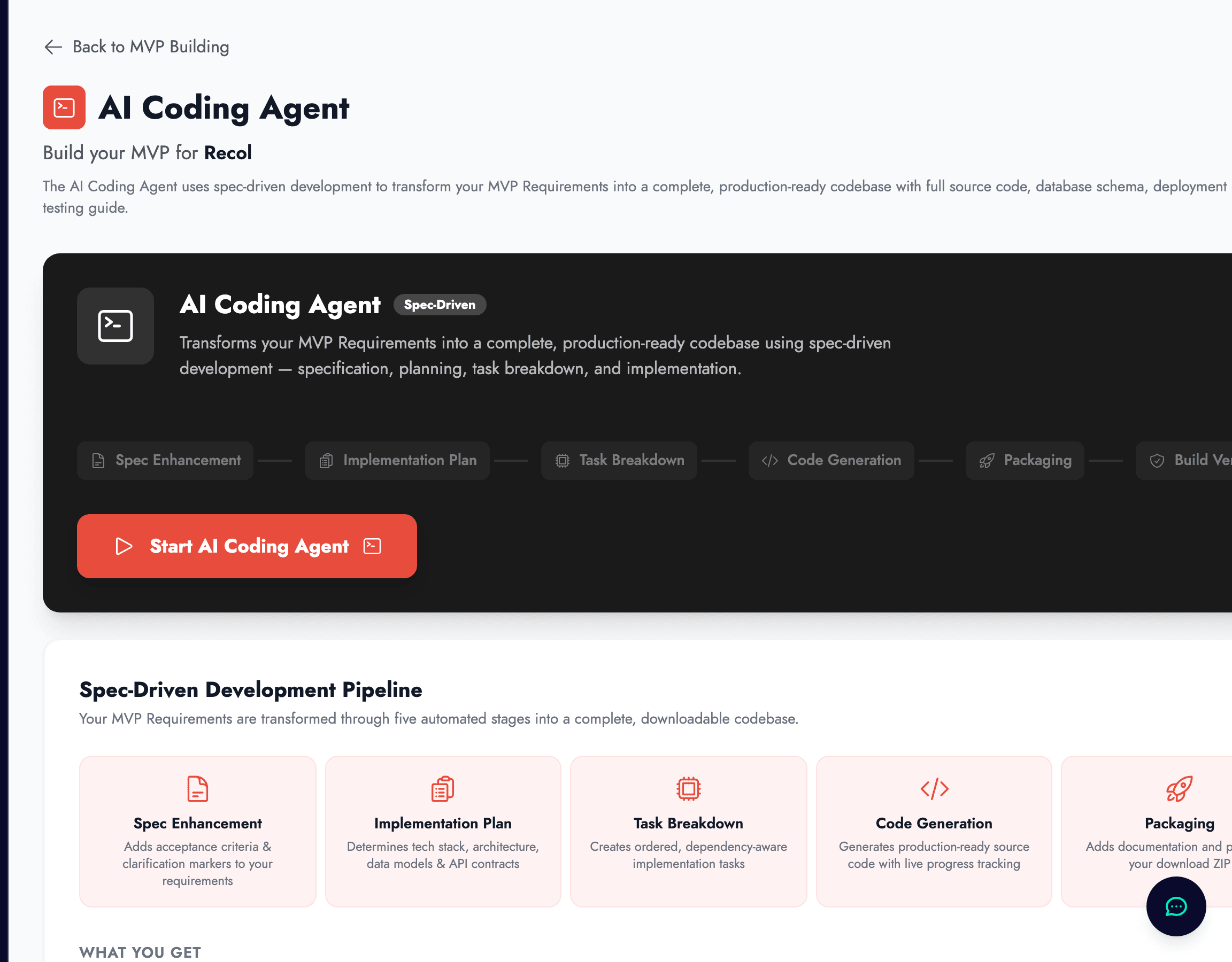
What the Coding Agent does, and what it does not do
The Coding Agent is zigzag’s automated path from product definition to initial implementation. Instead of jumping straight from a PRD to a blank editor, it runs a structured pipeline: it sharpens the requirements, creates an implementation plan, breaks the work into tasks, generates code, packages the project, and verifies the build before handing you a downloadable ZIP.
That makes it more rigorous than a simple prompt-to-code tool. The point is not just to emit files quickly. The point is to turn your MVP Requirements into a coherent project with architecture decisions, ordered implementation work, and visible progress while it runs.
It is still important to understand the limit of the feature. The Coding Agent produces a serious starting codebase, not a magically finished startup. You should expect to review the output, test it, adapt the stack decisions where necessary, and continue building from there.
Access, prerequisites, and when to start a run
In the current product flow, the Coding Agent is available on the Builder plan. The interface also expects your project groundwork to be in place before you start. In particular, zigzag checks that the MVP Requirements exist and, in the UI flow, that the Lean Canvas work is already present as well.
This is a good constraint rather than an arbitrary gate. Code generation is only useful once your requirements are specific enough to support real architecture and task decisions. If the requirements are still fuzzy, the resulting code will simply formalize that fuzziness.
The best time to use the agent is after you have made the major product-scope decisions deliberately. If you are still unsure who the user is, what the MVP includes, or what the core workflow should be, tighten the requirements first. The better the specification, the better the output.
What happens during a run
When you press Start, zigzag does not go directly into file generation. It first enriches the specification, then decides the implementation approach, then turns that approach into an ordered task list, and only then begins generating code. After code generation, it packages the project and runs build verification so the result is not just assembled, but checked.
This staged approach matters because it gives you visibility into the decisions being made on your behalf. The agent is not just writing files in the dark. It is following a build pipeline you can inspect while it works.
The phases surfaced in the UI are
- ✓Spec Enhancement, which adds acceptance criteria and clarification markers to your requirements.
- ✓Implementation Plan and Task Breakdown, which decide the stack, architecture, data model, API contracts, and ordered work items.
- ✓Code Generation, Packaging, and Build Verification, which create the project, prepare the download, and confirm the build path is viable.
How to read the live progress view
The Coding Agent page is designed to stay useful while the run is happening. You see live counts for lines of code, files generated, completed tasks, and overall progress percentage. The active phase is highlighted, and the running status message updates as the agent moves through its work.
You can also expand the implementation plan once it is ready. That reveals the chosen framework, language, database, styling approach, authentication strategy, deployment target, architecture pattern, and development principles. Below that, the task list shows which implementation steps are pending, in progress, complete, or errored, plus the files associated with completed tasks.
One practical advantage of this workflow is persistence. You can navigate away and come back later, and zigzag restores the active session rather than forcing you to babysit the page. If a run stalls or fails, the UI gives you explicit retry and stop paths instead of leaving you guessing about state.
What the finished output includes
When the run completes, zigzag packages the output into a downloadable project ZIP. This is not just a random collection of code files. The generated project is meant to include the full source code, database schema and migrations, a deployment guide, and a testing guide alongside the main implementation.
That combination matters because a useful starter project needs operational context as well as code. A codebase without a deployment path or data model forces you back into setup work immediately. The Coding Agent tries to hand over something that is much closer to a real starting repository.
You can also regenerate the project if needed. That is useful when the requirements have changed significantly enough that patching the first output would be more confusing than creating a new baseline from the updated specification.
How to use the output responsibly
The best way to treat the generated code is as a fast first implementation baseline. Review the architecture choices, inspect the project structure, run the application locally, and make sure the critical workflows match what you intended in the requirements. If something important feels wrong, fix the specification and generate again rather than layering hacks on top of a bad starting point.
If you are working with an external developer, the Coding Agent output can reduce briefing time dramatically. Instead of handing them only a PRD, you can hand them both the PRD and a live implementation baseline. That changes the conversation from "what should we build?" to "which parts of this starting point are right, and what should we improve?"
Used well, the Coding Agent shortens the journey from validated idea to executable product. It does not replace product judgment, technical review, or user testing. It removes a large amount of early implementation friction so those higher-value activities can happen sooner.